
MCP Lightroom Adjustments with Unique Camera Settings
Featured Products
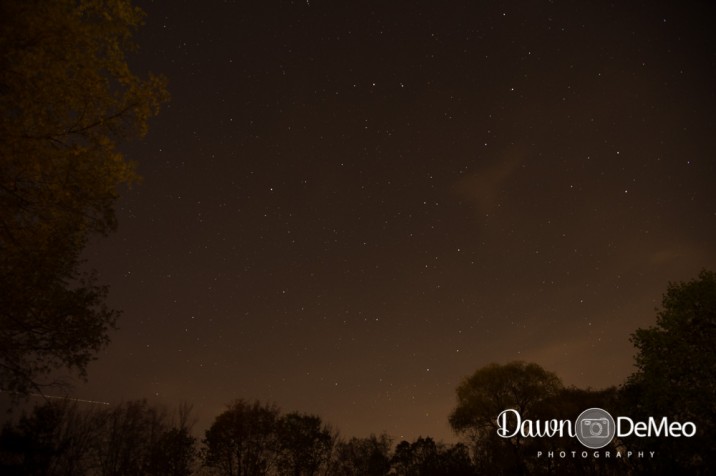
Before:
After:
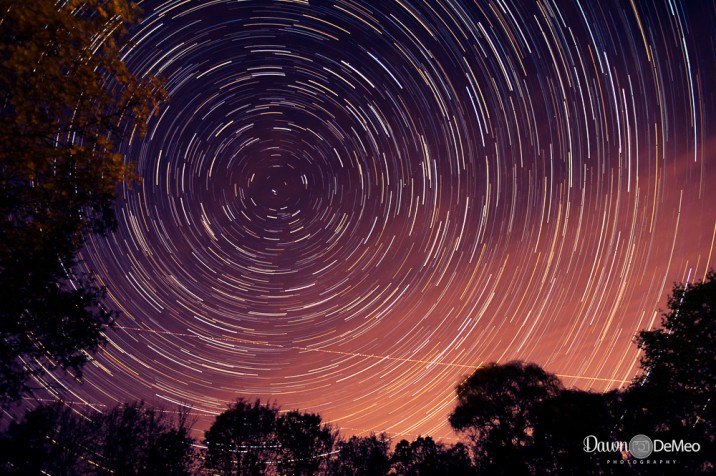
Photo Equipment & MCP Actions™ Products Used
Camera and Lens Used: [amazon_link id=”B006U49XM6″ target=”_blank” ]Nikon D4[/amazon_link], 24-120mm f/4
ISO, Aperture, Shutter Speed: ISO 640, f/4, 30 sec x 120 frames
Software Used: Lightroom, Photoshop
Actions/Presets Used: Enlighten Lightroom Presets
Extra Details:
Manual Edits:
Using the camera’s intervalometer I took 120 exposures of 30 seconds each over a period of 1 hour.
Enlighten Lightroom Presets:
Starting with the first of the 120 photos, I applied the following Enlighten presets…
- 2b lighten: 2/3 stop
- 1g clean
- 3a turn on lens corrections
- 1f overlay: lemon water
- g1 see clearly slight
- h2 noise reduction: medium
- j1 sharpen: slight
Then tweaked the Highlights, Shadows, Whites and Blacks sliders in the Basic panel until satisfied with the look. Those settings were than synced to the other 119 images and were opened as layers in Photoshop.
Manual Photoshop Edits:
- All the layers were selected and set the blending mode to Lighten, then flattened the image
- Added a Levels adjustment layer and nudged the black and midpoint markers
- Added a Color Balance adjustment layer and increased the blue slightly
Credits:
Image Title: Star Trails
By: Dawn DeMeo
Studio: Dawn DeMeo Photography
Website:
Recent Posts



