
MCP Actions Projects

MCP Project 52 weekly (Week 14) roundup + GIVEAWAY WINNER!
Fusion. That was this weeks theme and it was so neat seeing everyones interpretation of it. From smoke, family, kids, you name it…it was there. It was tough picking this weeks featured but I narrowed it down after weeding through a few times. If you are playing along, be sure to grab your ‘participant’ banner on the…

MCP Project 52 weekly roundup + GIVEAWAY!
What an amazing week! I think Just for Fun! has been my favourite week so far in our Project 52, I haven’t stopped smiling at all the interpretations and talent on display. It has been a privilege choosing a few of these photos to feature on the blog. We are trying something a little different…

MCP Project 52 Week 12 Wrap Up + Week 13 Theme
What a week filled with lots of creativity! We’ve loved seeing all of your shots “From the Jewelry Box” and also enjoyed those of you that took a break from the weekly themes and shared something else. This project seems to be serving its purpose, as we’ve already seen loads of improvement in the first…
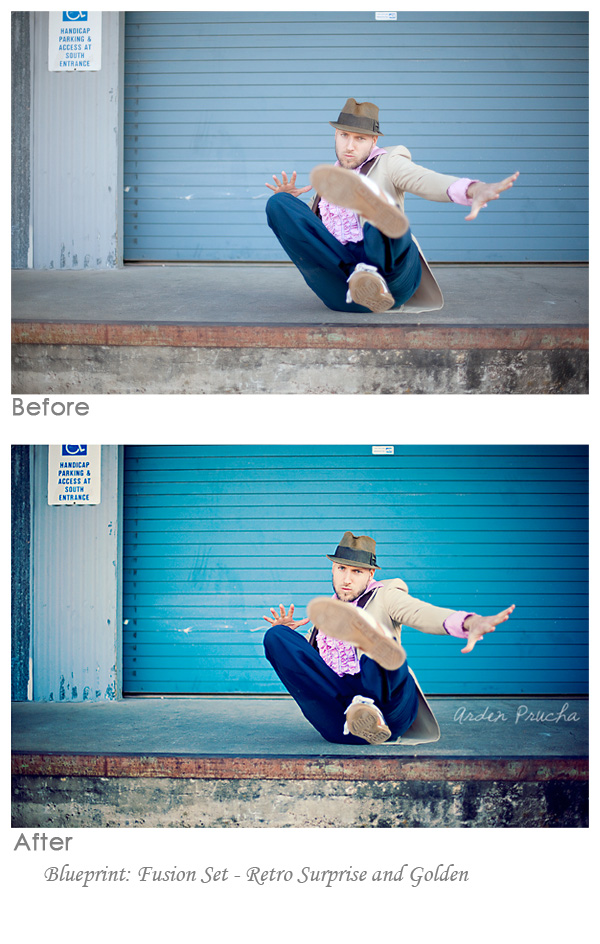
Fusion Photoshop Actions: Before and After Edits from Customers
I am so happy that so many of you are sharing your before and after edits using MCP Photoshop actions, and especially our newest set – Fusion. I invite all of you to download our Free Facebook Fix actions which provide you an easy way to share your before and after images on our Facebook…

Super Moon Photography: How to Shoot the Moon
Super Moon Photography: How to Shoot and Photograph the Moon Once every so often the moon gets really close to the Earth. Last night it was the closest it had been in more than 18 years. I was in my last year of college at Syracuse University, and I have to tell you, I was…
MCP Project 52 – week 11 recap – welcome to week 12
Welcome to this week’s overview of the theme “darks and lights” where I’ll be highlighting just a very small sampling of the vast amount of fantastic photos submitted to our group pool. It is so great to see the number of members still growing; we’re at 3,100 now! And to think that the majority of those members regularly…

Photoshop Actions Blueprint: Snapshot to Portrait in a Few Clicks
Photoshop Actions Blueprint: Snapshot to Portrait in a Few Clicks All Photoshop actions shown in this Blueprint are from the MCP Fusion Photoshop action set Question: I often get asked “Can I make a snapshot photograph into something worthy of hanging on my wall?” My Answer: Yes, you can! Not all photos you hand on…

How to Use the FREE Photoshop Actions: Mini Fusion & TOL/TOD
How to Use the FREE Photoshop Actions: Mini Fusion & TOL/TOD If you love the word FREE and are wondering how to put it to good use, you can download the Free Photoshop actions, Mini Fusion and Touch of Light/Touch of Darkness from the MCP Actions Website. These actions are compatible with Photoshop (CS2 and…
MCP Project 52 – Week 10 review – Launch Week 11
Welcome to our regular MCP Project 52 blog post where we’ll be looking back over week 10 and giving a little sneak preview of the new week 11 theme. I knew this was going to be a fun and memorable week with the theme “Childhood Toys” . Really made me walk down memory lane and…
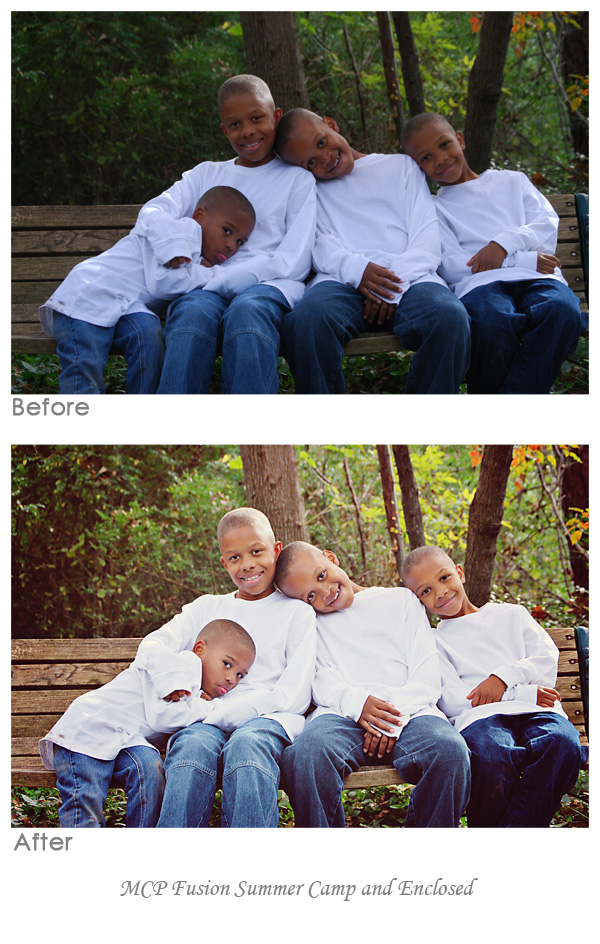
Blueprint: Before and After with MCP Fusion Photoshop Actions
Blueprint: Before and After with MCP Fusion Photoshop Actions Blueprint: all Photoshop actions shown in this Blueprint are from the MCP Fusion Photoshop action set Question: I often get asked “How can I effectively edit subjects with darker skin tones?” My Answer: Edit them the same as you would any other subjects. Pay attention to…

MCP Project 52 – Week 9 review & Week 10 launch
Welcome to our regular MCP Project 52 blog post where we’ll be looking back over week 9 and giving a little sneak preview of the new week 10 theme. And what a fun week it’s been, the theme “Express yourself” has inspired a lot of people to get out there and take some great photos. …
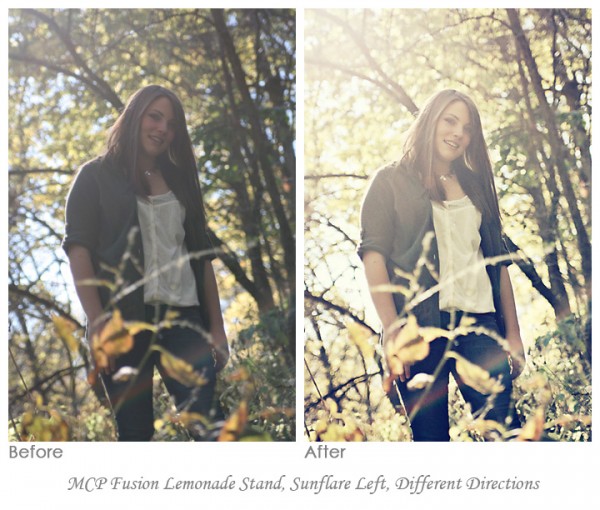
Blueprint: How to Deal with Haze and Add Sun Flare in Photoshop
Blueprint: all Photoshop actions shown in this Blueprint are from the MCP Fusion Photoshop action set Question: I often get asked “How can I fix an hazy, low contrast image?” My Answer: Add some contrast but also embrace the haze.. While editing, if the photo was too bright, decrease exposure using curves. Or if it…

Blueprint Shares from Customers: Fusion & Mini Fusion Photoshop Actions
I love when people share their before and after edits using MCP Photoshop actions. I invite all of you to download our Free Facebook Fix actions which provide you an easy way to share your before and after images on our Facebook Page. Just add text to indicate what actions you used or which photo…

MCP Fusion Photoshop Actions Now Available: One Click, Infinite Possibilities
The MCP Fusion Photoshop action set combines the most versatile and user-friendly workflow actions with beautiful color and black and white conversions, bringing you an action set with unlimited combinations. These actions will change the way you edit in Photoshop.
MCP Project 52 – Week 8 Wrap Up + Week 9 Theme
Another amazing week of amazing photos captured by our almost 3000 participants. WOW! Personally, the last couple of weeks have been crazy for me. I moved to a new home and was unable to participate. So just like me, don’t be discouraged if you miss a week or two. Just jump back on board and…

Fixing an Underexposed Shot with Photoshop Actions: A Blueprint
Fixing an Underexposed Shot with Photoshop Actions: A Blueprint Sometimes you get that perfect composition, with a cute from the child looking at the camera, but you don’t nail the exposure. It happens to both hobbyist and professional photographers at one time or another. Usually, if you have a better one, this shot might get…
MCP Project 52 – Week 7 Wrap Up + Week 8 Theme
First off: If you haven’t already done so, download the FREE Fusion Mini Action Sets for Photoshop and Elements! You can download them from the MCP Actions website. The full Fusion Action Set goes on sale March 1, 2011, so this is a super opportunity to try it before you buy it! You can also…

Photographer’s Wall Display Templates: Wall Guides Available Now
Photographer’s Wall Display Templates: Wall Guides Now Available As soon as I set eyes on this product I knew it was something that you all would love as much as I do, which is why I am so excited to be announcing MCP’s partnership with Ariana Falerni, photographer and creator of the Photographer’s Wall Display…
MCP Project 52 – Features from Week 6 + Theme for Week 7
Welcome to our look back at week 6 of MCP Project 52, and the launch of the theme for the upcoming week! It’s been a great week for MCP Project 52, we’re almost to 3,000 members and we’ve had a ton of beautiful work submitted for the Words theme. We’d love to have more members,…

MCP Project 52 – Features from Week 5 + Theme for Week 6
Welcome to our look back at week 5 of the MCP Project 52 and the launch of the theme for the coming week. Here we are at Week 5! Over 2700 members in our Flickr group and over 4,000 pictures uploaded! You guys are rocking this project. On a quick note…congratulations to Roxi04 for being…
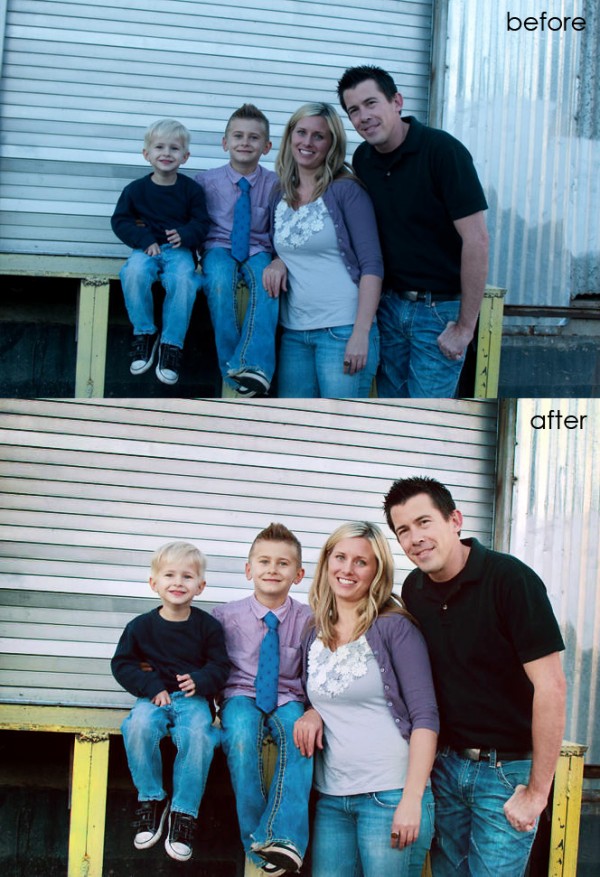
Color Correction in Seconds Using Photoshop Actions
Color Correction in Seconds Using Photoshop Actions The best way to get accurate color is definitely shooting Raw and doing a custom white balance. But just because you know you should shoot this way, does not mean you will. In a recent Private Photoshop Training Class with Harmony Kellis, we worked on an image of…
Recent Posts








