
Maternity Photos Edited Quickly with MCP Fusion
August 6, 2015/
Last Updated March 23, 2020
Featured Products
-
Sale!
 Essential Photoshop Actions
Makeup Toolkit Premium Photoshop Action
Original price was: $79.00.$57.00Current price is: $57.00. -
Sale!
 Essential Photoshop Actions
Fusion™ Photoshop Actions
Original price was: $79.99.$58.00Current price is: $58.00. -
Sale!
 Essential Photoshop Actions
Bag of Tricks™ Photoshop Actions Set
Original price was: $69.99.$51.00Current price is: $51.00. -
Sale!
 Essential Photoshop Actions
Newborn Necessities™ Newborn Baby Editing Photoshop Actions Set
Original price was: $39.99.$29.00Current price is: $29.00. -
Sale!
 Essential Photoshop Actions
All in the Details™ Photoshop Actions Set
Original price was: $69.99.$51.00Current price is: $51.00. -
Sale!
 Essential Photoshop Actions
Complete Workflow™ Photoshop Actions Set
Original price was: $49.99.$36.00Current price is: $36.00. -
Sale!
 Essential Photoshop Actions
Inspire™ Photoshop Actions
Original price was: $99.99.$72.00Current price is: $72.00. -
Sale!
 Essential Photoshop Actions
Portrait Suite Frequency Separation Photoshop Action
Original price was: $63.99.$47.00Current price is: $47.00.
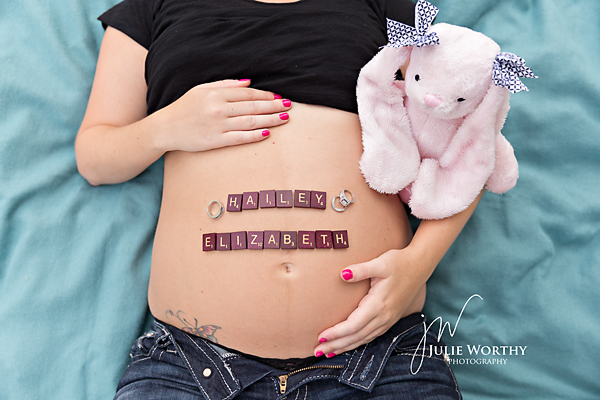
Before:
After:
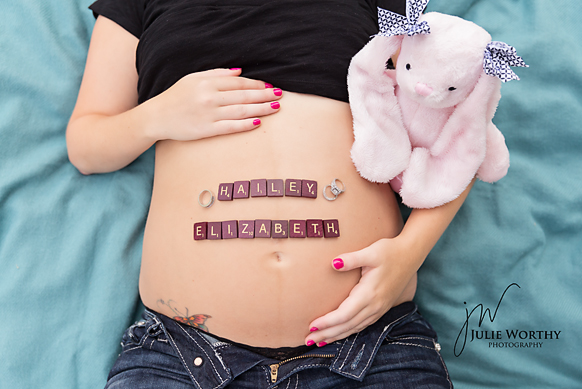
Photo Equipment & MCP Actions™ Products Used
Camera and Lens Used: [amazon_link id=”B009B0MZ8U” target=”_blank” ]Canon 6D[/amazon_link] and 24-70 2.8 Canon Lens
ISO, Aperture, Shutter Speed: ISO 500, f/2.8, SS 2000
Software Used: Photoshop
Actions/Presets Used: Fusion Photoshop Actions
Extra Details:
Manual Adjustments in Camera Raw:
Under the Basic Tab –
- Temp 5950
- Tint +9
- Exp -10
- Highlights -42
Under the Detail Tab –
- Sharpening 60
- Radius 1.5
- Detail 50
- Mask 5
- Noise Reduction
- Luminance 30
- Luminance Detail 50
- Color 25
- Color Detail 50
- Color Smoothness 50
Fusion Photoshop Actions:
- Magic Markers with 65% brush – Darkened her tattoo & brought slider downn to about 70%
- Exact-O-Sharp with brush at 65% – Sharpened the rings and broght the opacity slider down to 50%
- Patch Tool – hand selected spots to remove where ever there were spots on shirt or a stray hair
- MCP One Click Color at 30%
- Perfect Fit Web Resize
Magic Skin Photoshop Actions:
- MCP Magic Foundations with Creamy brought down to 50 and Cover Up down to 40
Credits:
Image Title: Our First – Hailey!
By: Julie Worthy
Studio: Julie Worthy Photography
Website: https://www.julieworthyphotography.com/
Recent Posts








