
Featured Products

Thanks to Karen Gunton of Smile, Play, Love Photography in Australia, for sending in this Blueprint.
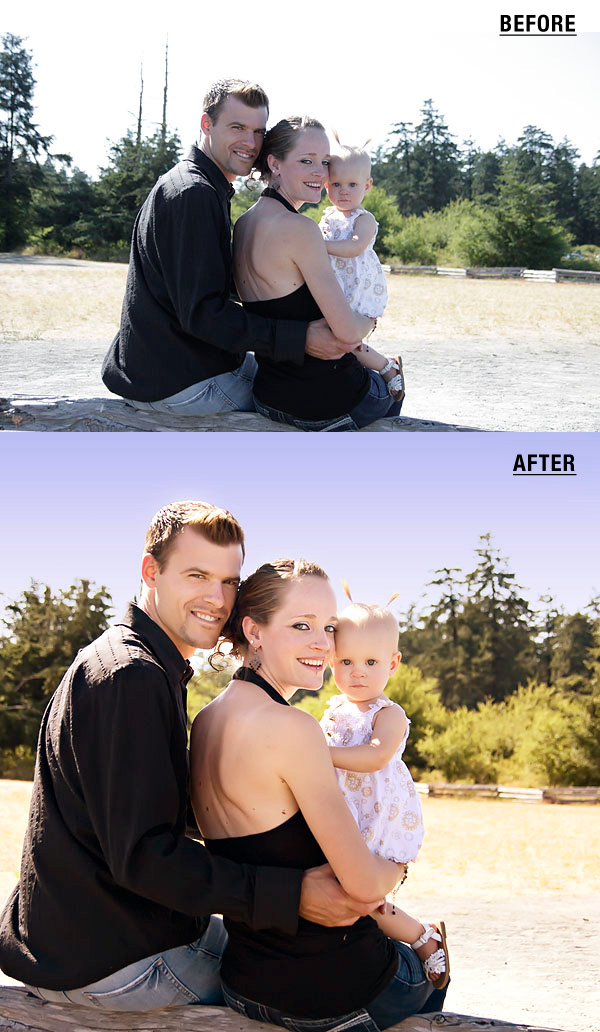
Karen wrote: The sun was behind this family. The camera could not handle the dynamic range and I did not have fill flash or a reflector. The sky was blown and their faces were quite dark. I actually have the same shot from the other side of the family, as they were looking at the ocean, and it includes a gorgeous blue sky, so I wanted to try to save this photo so that I could give both shots to the family.
The first thing I had to do was fix mom’s eyes – it looks like she was just about to blink! So I cloned better eyes from another shot (one where the baby was hiding her face!). To do this, I used the clone tool. At the same time I decided the dead treetops were distracting so I cloned those out too. Then I went on to my regular editing steps.
- Ran Imagnomic’s Noiseware at default settings
- Used MCP actions “powder your nose” from the Magic Skin Photoshop action set to remove the bruise from the baby’s forhead – set at default opacity.
- Bumped the midtones in Curves
- Added contrast with light s-curve using Curves
- Used MCP actions “touch of light” free photoshop action to reduce the shadows on all of their faces – set at 60% opacity
- Used the Magic See-Saw action from the Bag of Tricks action set to adjust the skin tones and color – added red/reduced cyan, added yellow/reduced blue.
- Flattened the image and used MCP actions “fake blue sky” action from the Bag of Tricks set and left it at the default opacity. This action worked like a charm! It looks so real and identical to the sky in another image taken in a different direction where I did not have a blown sky.

No Comments
Leave a Comment
You must be logged in to post a comment.
Recent Posts




I *just* took some photos of my children in back-lit full sun… this is exactly what I needed, thanks! 🙂
Wow…that is beautiful! What a fabulous fix!
Wow. When I first looked at this photo, I kind of thought, this is a snapshot… not even worth the time or effort to save. The edited pic really looks like a portrait! I am amazed.
This looks amazing! I wouldn’t even think to clone the eyes, they look great!
Wow! How do you clone from one picture to another? I have only ever cloned from the same picture. Very cool!
awesome post! I always like to visit your blog to see something new 🙂