
Featured Products

Retouching 101
If you find yourself stressed out while editing images, we are here to help. Learn to go from the BEFORE to the AFTER quickly.
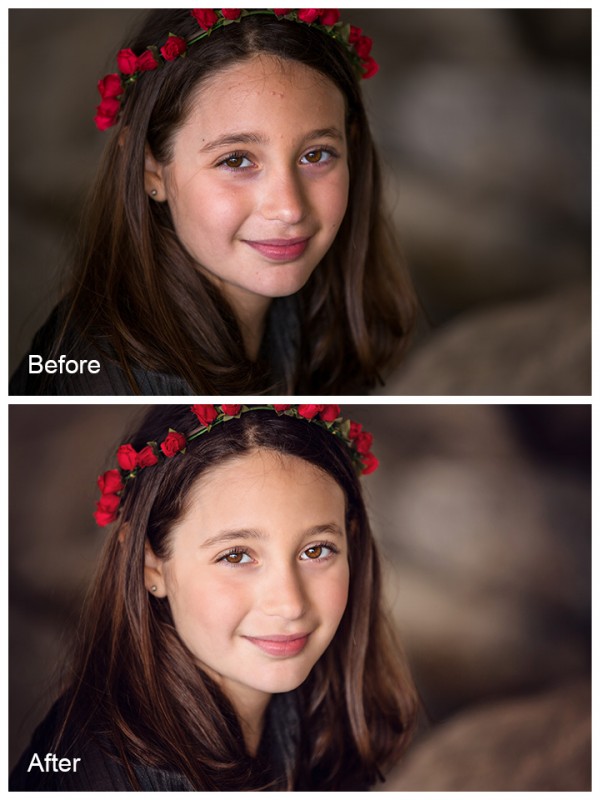
The video at the bottom of this post will teach you in depth. But here are the products we used in this edit:
- Skin Smoothing – Magic Skin Photoshop Actions
- Eye Enhancements – Eye Doctor Photoshop Actions
- Fixing stray hairs and acne – Spot Healing Brush Tool (part of Photoshop)
- Reducing Under Eye Circles/Shadows – Patch Tool (part of Photoshop)
- Reducing Shiny Spots on Skin – Bag of Tricks Actions
- General workflow and toning – Fusion Actions
You certainly could do more of the work by hand, but you will save time if using these products.
Watch the retouching video tutorial now:
[embedplusvideo height=”365″ width=”600″ standard=”http://www.youtube.com/v/bIUzx6HTi6o?fs=1″ vars=”ytid=bIUzx6HTi6o&width=600&height=365&start=&stop=&rs=w&hd=0&autoplay=0&react=1&chapters=¬es=” id=”ep5112″ /]
Posted in Blueprints, Photoshop Tips

No Comments
Leave a Comment
You must be logged in to post a comment.
Recent Posts




For those pse 10 users who don’t have the patch tool, do you know of another way to decrease the under eye shadows?
Great tutorial and very helpful to see how you use your own actions. Would love to see more videos like this one. Thanks! I use your actions all the time.
I’ve Used This This Product And Really Like Using It