Featured Products
-
Essential Photoshop Actions
Makeup Toolkit Premium Photoshop Action
Original price was: $79.00.$57.00Current price is: $57.00. -
Essential Photoshop Actions
Fusion™ Photoshop Actions
Original price was: $79.99.$58.00Current price is: $58.00. -
Essential Photoshop Actions
Bag of Tricks™ Photoshop Actions Set
Original price was: $69.99.$51.00Current price is: $51.00. -
Essential Photoshop Actions
Newborn Necessities™ Newborn Baby Editing Photoshop Actions Set
Original price was: $39.99.$29.00Current price is: $29.00. -
Essential Photoshop Actions
All in the Details™ Photoshop Actions Set
Original price was: $69.99.$51.00Current price is: $51.00. -
Essential Photoshop Actions
Complete Workflow™ Photoshop Actions Set
Original price was: $49.99.$36.00Current price is: $36.00. -
Essential Photoshop Actions
Inspire™ Photoshop Actions
Original price was: $99.99.$72.00Current price is: $72.00. -
Essential Photoshop Actions
Portrait Suite Frequency Separation Photoshop Action
Original price was: $63.99.$47.00Current price is: $47.00.
MCP Actions Website | MCP Flickr Group | MCP Reviews
I get a lot of questions from customers about what to do when Photoshop starts acting like it is in control. I am going to be posting some frequent asked questions from MCP Actions customers and blog visitors. If you have a quick question about Photoshop you want answered, please email me and I may use it in a future blog entry. If you have lots of questions on lengthier topics, please contact me for details on my MCP one on one training.
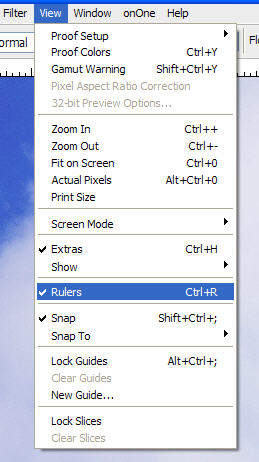
Question: “Why are there rulers around my photo? I do not want them.”
Answer: To get rid of rulers, go under “view” and click on rulers to uncheck. If you want rulers and they are not showing, then check it off instead.