
Featured Products

Learn to use Photoshop actions to make skin smoother, eyes brighter and fix the exposure of your images.
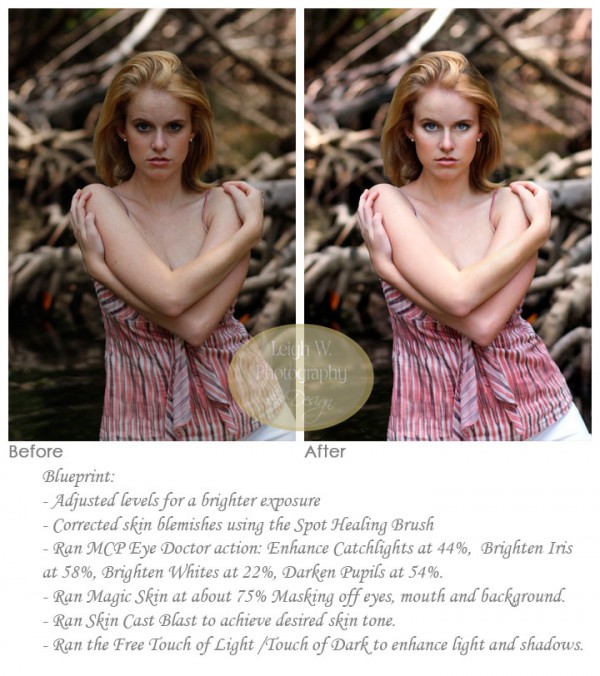
While ideally you want the perfect photo in camera, most images need a little lift from a digital darkroom with photo editing and retouching. MCP customer Leigh Williams was in Virginia Key in Miami when she snapped this image of her daughter.
I am showing two options with this image. Her edit and then my edit. As always there is no correct or incorrect, just different ways to edit the same image.
Leigh’s edit:
Her before and after Blueprint edited used a few manual steps along with our retouching actions: The Eye Doctor and Magic Skin. Plus she used the Free Photoshop action: Touch of Light/Touch of Darkness. Detailed steps on how Leigh accomplished this fashionable edit are below the before and after shots.
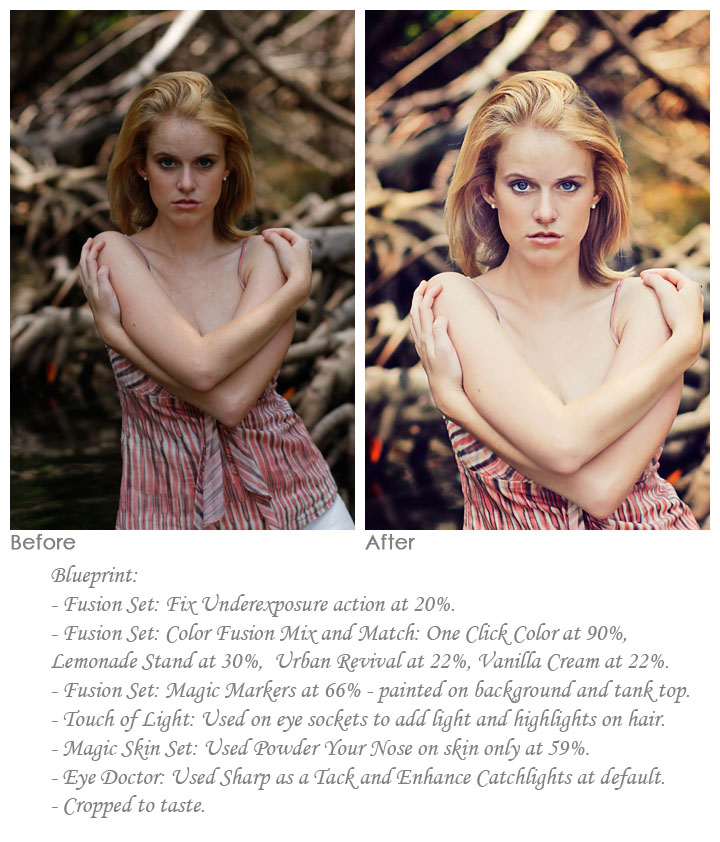
Jodi (MCP Actions) edit:
I started by using the Fusion Set to correct overall exposure and to give the photo a distinct look. Then I finished by merging and retouching the image using The Eye Doctor and Magic Skin’s Powder Your Nose. I also did selective lighting with Touch of Light. Below my image, an exact step-by-step list is available so you can try and replicate this look on your photos.

No Comments
Leave a Comment
You must be logged in to post a comment.
Recent Posts




I like your crop but prefer the more natural feel of Leigh’s. Both are very nice.
excellent photoshop tutorial about smoothing skin 🙂