

Featured Products
-
Essential Photoshop Actions
Makeup Toolkit Premium Photoshop Action
Original price was: $79.00.$57.00Current price is: $57.00. -
Essential Photoshop Actions
Fusion™ Photoshop Actions
Original price was: $79.99.$58.00Current price is: $58.00. -
Essential Photoshop Actions
Bag of Tricks™ Photoshop Actions Set
Original price was: $69.99.$51.00Current price is: $51.00. -
Essential Photoshop Actions
Newborn Necessities™ Newborn Baby Editing Photoshop Actions Set
Original price was: $39.99.$29.00Current price is: $29.00. -
Essential Photoshop Actions
All in the Details™ Photoshop Actions Set
Original price was: $69.99.$51.00Current price is: $51.00. -
Essential Photoshop Actions
Complete Workflow™ Photoshop Actions Set
Original price was: $49.99.$36.00Current price is: $36.00. -
Essential Photoshop Actions
Inspire™ Photoshop Actions
Original price was: $99.99.$72.00Current price is: $72.00. -
Essential Photoshop Actions
Portrait Suite Frequency Separation Photoshop Action
Original price was: $63.99.$47.00Current price is: $47.00.
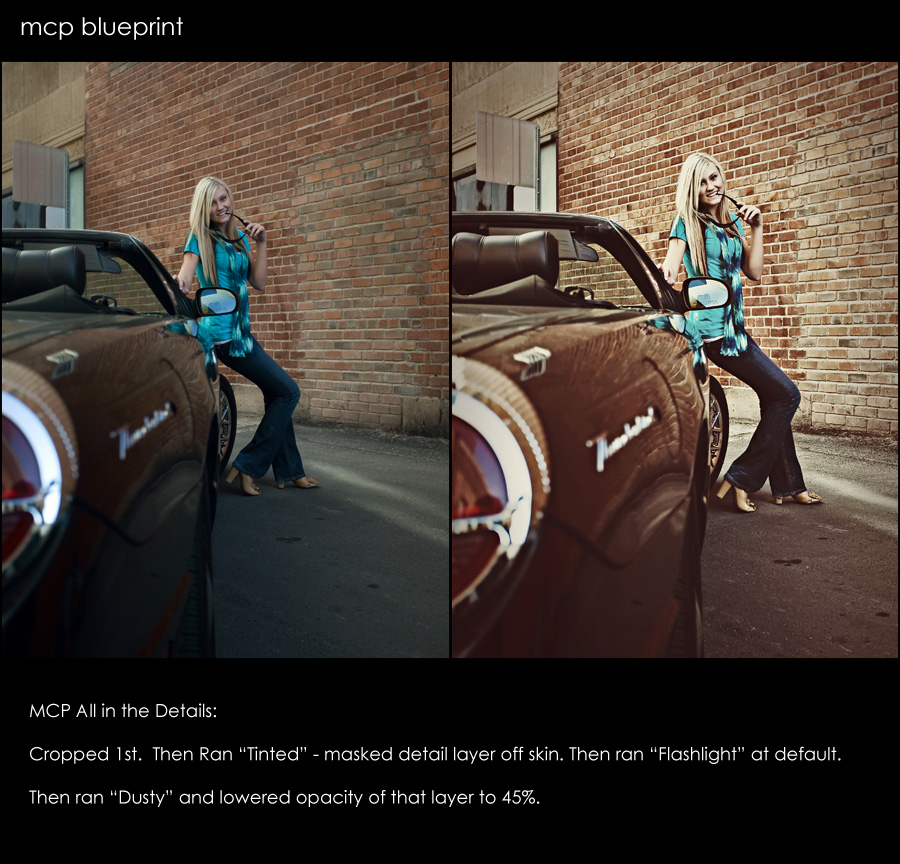
Some photos take a lot of editing, while others just need a few quick clicks of the mouse. Here is an edit that was done in about 30 seconds or less.
- Started by cropping.
- Then used “All in the Details” Tinted action. Masked detail layer completely off skin.
- Then used “All in the Details” Flashlight Photoshop action at the default opacity.
- Then used “All in the Details” Dusty vignette action – changed the opacity to 45%.
That was what got me from the before to after – I love how it brought out details in the bricks and pulled out shine on the car. Looking at it now, I might have preferred it more if I lighted the socket area around her eyes. What thoughts or feedback do you have. Next time you look at an image you edit, try and critique it as I did above – see if there is something you would change or do differently with past edits too.
Posted in Blueprints, Photoshop Tips





