
Featured Products

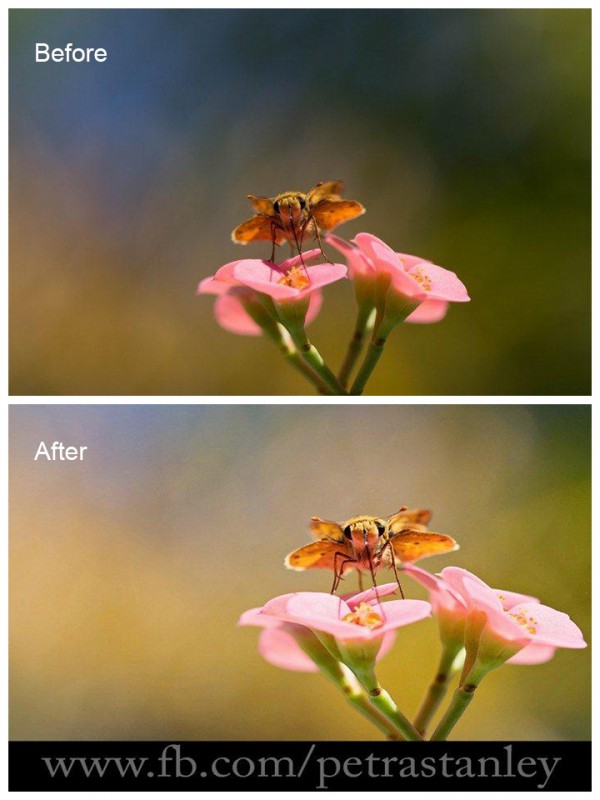
Before and After Step-by-Step Edit: Small Changes Equal Big Results to your edited photographs
The MCP Show and Tell Site is a place for you to share your images edited with MCP products (our Photoshop actions, Lightroom presets, textures and more). We’ve always shared before and after Blueprints on our main blog, but now, we will sometimes share some favorites from Show and Tell to give these photographers even more exposure. If you haven’t checked out Show and Tell yet, what are you waiting for? You’ll learn how other photographers are using our products and see what they can do for your work. And once you are ready, you can show off your own editing skills using MCP goodies. You might even make new friends or gain a customer…. since you get to add your website address right on the page. Bonus!
Today’s Featured Image:
By: Petra Stanley
Studio: Petra Stanley Art and Photography
Equipment Used: Shot with a 100mm Macro lens
Settings: ISO 100, f/5.0 1/400
Software: Lightroom and Photoshop
MCP sets used: MCP’s Free Lightroom Presets, Fusion Photoshop Actions
- Steps taken to achieve the look:
- Began by editing in Lightroom with MCP mini clicks at 1/3 stop exposure lighten
- Exported to Photoshop
- Used MCP Fusion One Click Color at 60%
- Resized for Web with the action in MCP Fusion

No Comments
Leave a Comment
You must be logged in to post a comment.
Recent Posts




wow this is so awesome! I can’t wait to try this out
so cute!