
Featured Products
-
Sale!
 Essential Photoshop Actions
Makeup Toolkit Premium Photoshop Action
Original price was: $79.00.$57.00Current price is: $57.00. -
Sale!
 Essential Photoshop Actions
Fusion™ Photoshop Actions
Original price was: $79.99.$58.00Current price is: $58.00. -
Sale!
 Essential Photoshop Actions
Bag of Tricks™ Photoshop Actions Set
Original price was: $69.99.$51.00Current price is: $51.00. -
Sale!
 Essential Photoshop Actions
Newborn Necessities™ Newborn Baby Editing Photoshop Actions Set
Original price was: $39.99.$29.00Current price is: $29.00. -
Sale!
 Essential Photoshop Actions
All in the Details™ Photoshop Actions Set
Original price was: $69.99.$51.00Current price is: $51.00. -
Sale!
 Essential Photoshop Actions
Complete Workflow™ Photoshop Actions Set
Original price was: $49.99.$36.00Current price is: $36.00. -
Sale!
 Essential Photoshop Actions
Inspire™ Photoshop Actions
Original price was: $99.99.$72.00Current price is: $72.00. -
Sale!
 Essential Photoshop Actions
Portrait Suite Frequency Separation Photoshop Action
Original price was: $63.99.$47.00Current price is: $47.00.

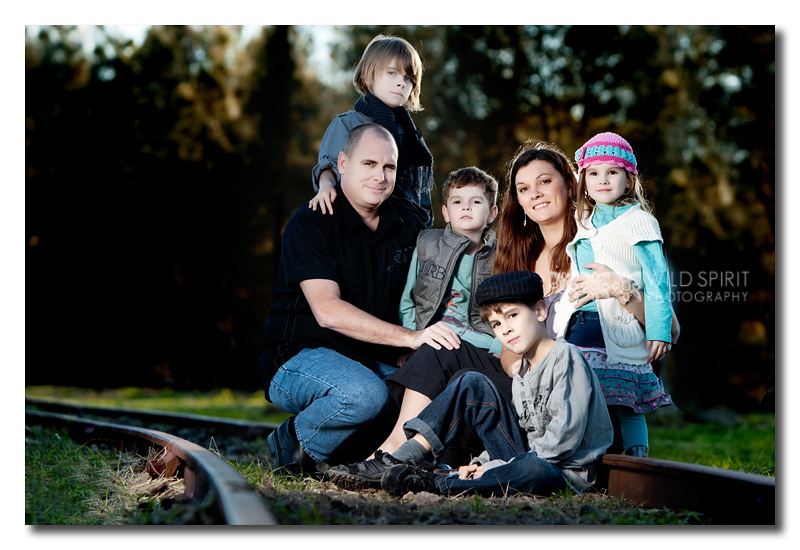
This week’s Blueprint uses no actions and barely any editing. Why? Because of the advantages of off camera flash photography is less editing. YAY! Ainslie Bernoth, who is doing a Free flash photography six part series, which is 1/2 way through, sent me this image – her before and after with steps.
Ainslie started by viewing her Raw image in a thumbnail viewer rather than Bridge. She only shoot around 80 images per session and she rarely batch edits.
Her settings for this photo were:
ISO 100
Shutter Speed of 1/160
Aperture of f/4.5
Lens used: 70-200mm
Trigger for flash: pocket wizards
She then pick the image she wanted to process in ACR (Adobe Camera Raw) and clicked open.
- She brought up the blacks to + 9, which added contrast.
- She adjusted the brightness up to +63.
- Then she brought it into Photoshop to clone out the pole behind standing boy, and the base of the trees/grass to stop distractions of the background.
- She also cloned light stand leg and cropped out light stand.
- Lastly she ran Portraiture by Imagenomic at the default opacity.
So as you can see – minus the cloning, which just takes a minute or two, this edit was super fast.
Here is the before: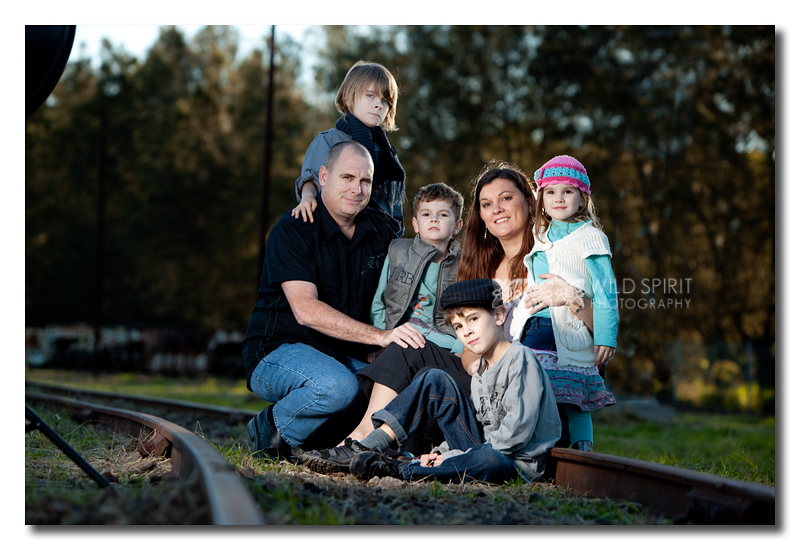
And here is the after:

No Comments
Leave a Comment
You must be logged in to post a comment.
Recent Posts









thank you for sharing! Refreshing and inspiring….